


Rescript vs Premiere Pro
Rescript vs Premiere Pro
Premiere Pro is a professional NLE that gained Text-Based Editing in 2023: transcribe a clip, then build a sequence by editing the transcript. Rescript does only that, but free, open source, without a Creative Cloud subscription, and on Linux as well as macOS and Windows. If the project needs colour, effects, motion graphics, or a real multi-track sequence, use Premiere. If transcript editing is the whole job, Rescript is a complete answer to it.
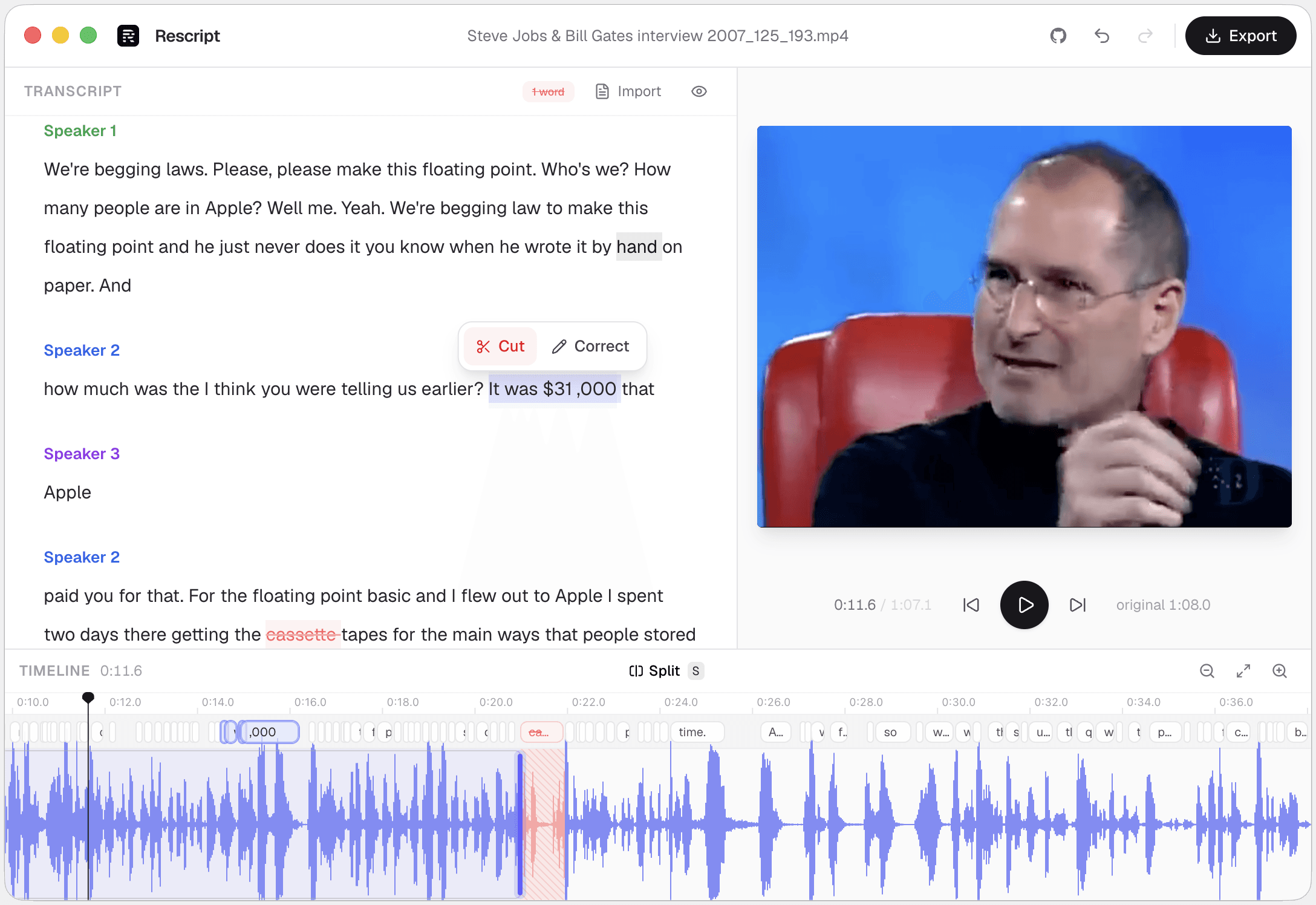
Side by side
Rescript compared with Premiere Pro.
| Feature | Rescript | Premiere Pro |
|---|---|---|
| Price | Free and open source for noncommercial use | Creative Cloud subscription |
| Source code | Public on GitHub — auditable | Proprietary |
| Runs on | Browser, macOS, Windows, Linux | macOS and Windows only |
| Where your media goes | Nowhere. It never leaves your device | Processed locally; transcription runs on-device |
| Account required | None — open it and start editing | Adobe account and licence check required |
| Watermark | Never | None |
| Works offline | Yes, once the model has downloaded a first time | Yes, but licensing requires periodic sign-in |
| Delete words to cut footage | Word-level, with a live preview of the cut | Text-Based Editing builds the sequence from the transcript |
| Filler word removal | One click across the whole file | Detects and removes filler words |
| Silence removal | One click, pauses of 0.3s and over | Detects and removes pauses |
| Speaker detection | Local diarization, speakers renameable | Speaker labelling in the transcript |
| Rewrite a line and have it spoken | Yes — cloned from that speaker's own audio, on-device | Enhance Speech repairs audio; no in-file voice cloning |
| Multitrack, layers, effects | No — one clip, transcript-first | A full professional NLE |
| Noise removal / audio repair | No — nothing like Studio Sound | Enhance Speech, Essential Sound |
| Burned-in captions | Exports SRT/VTT to burn in elsewhere; no styled overlay yet | Full caption styling and burn-in |
| Round-trip to Premiere / Final Cut | Not yet — renders finished media instead | It is the NLE |
 Rescript
Details about other products come from their own public pricing and documentation pages and change often — check theirs before you decide. Corrections are welcome as a GitHub issue.
Both are local — the difference is scope and cost
This is the one comparison where privacy isn't the differentiator. Premiere's speech-to-text runs on your own machine too, so your footage stays local either way. What separates them is scope: Text-Based Editing is one panel among hundreds in Premiere, and the entire interface in Rescript.
Premiere can finish anything. Rescript opens in a browser tab in seconds, runs on Linux, and costs nothing. For a podcast, interview, lecture, or talking-head video, the extra surface area in Premiere is mostly in the way.
Getting from Rescript into an NLE
Rescript renders finished media rather than an edit decision list, so there's no XML or FCPXML round-trip today — that's an open roadmap item. You can export the cut as MP4 or WebM and bring it into Premiere as a clip, or export SRT/VTT captions from the edited timeline.
A workflow that works well: rough-cut in Rescript, where deleting words is fast, then finish in Premiere with the tightened file as your starting point.
Which one
They're good at different jobs.
Choose Premiere Pro if…
- The project has multiple sources, b-roll, music, colour, and graphics.
- You already pay for Creative Cloud and round-trip to After Effects or Audition.
- You need broadcast-grade caption styling and delivery specs.
- Enhance Speech is rescuing audio you can't re-record.
Choose Rescript if…
- Transcript-based cutting is the entire task and an NLE is overkill.
- You're on Linux, where Premiere doesn't run.
- You don't want a subscription, or can't install a 20 GB application.
- You want to rewrite a fumbled line and have it spoken in the original voice.
FAQ
Questions people actually ask
Is there a free alternative to Premiere's Text-Based Editing?
Rescript is one: it transcribes locally with Whisper, cuts footage as you delete words, removes fillers and silences in one click, and exports MP4 or WebM up to 4K — free for noncommercial use, with no subscription and no account.
Can Rescript export an XML or EDL to Premiere?
Not yet. It exports rendered video and audio plus SRT/VTT/JSON captions. Timeline interchange with editing tools is on the roadmap.
Does Rescript run on Linux?
Yes — as an AppImage or a .deb, and in any Chromium-based browser. Premiere Pro is macOS and Windows only.
Keep comparing

Rescript vs Descript
The original transcript-based editor — and a full cloud studio.

Rescript vs Riverside
Remote recording studio with a text-based editor attached.

Rescript vs VEED
Browser video editor with subtitles and AI tools.

Rescript vs Kapwing
Collaborative online editor with text-based trimming.

Rescript vs CapCut
ByteDance's free general-purpose editor.

Rescript vs Podcastle
Cloud podcast studio with AI voices and Magic Dust.

Rescript vs Recut
One-time-purchase desktop app for cutting silences.

Rescript vs TimeBolt
Automatic cutting of silence and filler words.

Rescript vs Cleanvoice
AI post-processing service for podcast audio.
Try it before you renew Premiere Pro.
Free, open source, and running on your own machine in under a minute. No account, and nothing to cancel later.
Or open the web app