


Rescript vs Cleanvoice
Rescript vs Cleanvoice
Cleanvoice is a service, not an editor: upload audio, its models strip filler words, stutters, mouth sounds, and dead air, and you download a cleaned file, billed per hour. Rescript is an editor that does the filler and silence removal locally, in one click each, for free, and then lets you keep editing by transcript. Cleanvoice detects more categories of nuisance — mouth sounds and stutters especially. Rescript costs nothing, never uploads your audio, and leaves you in control of every cut it makes.
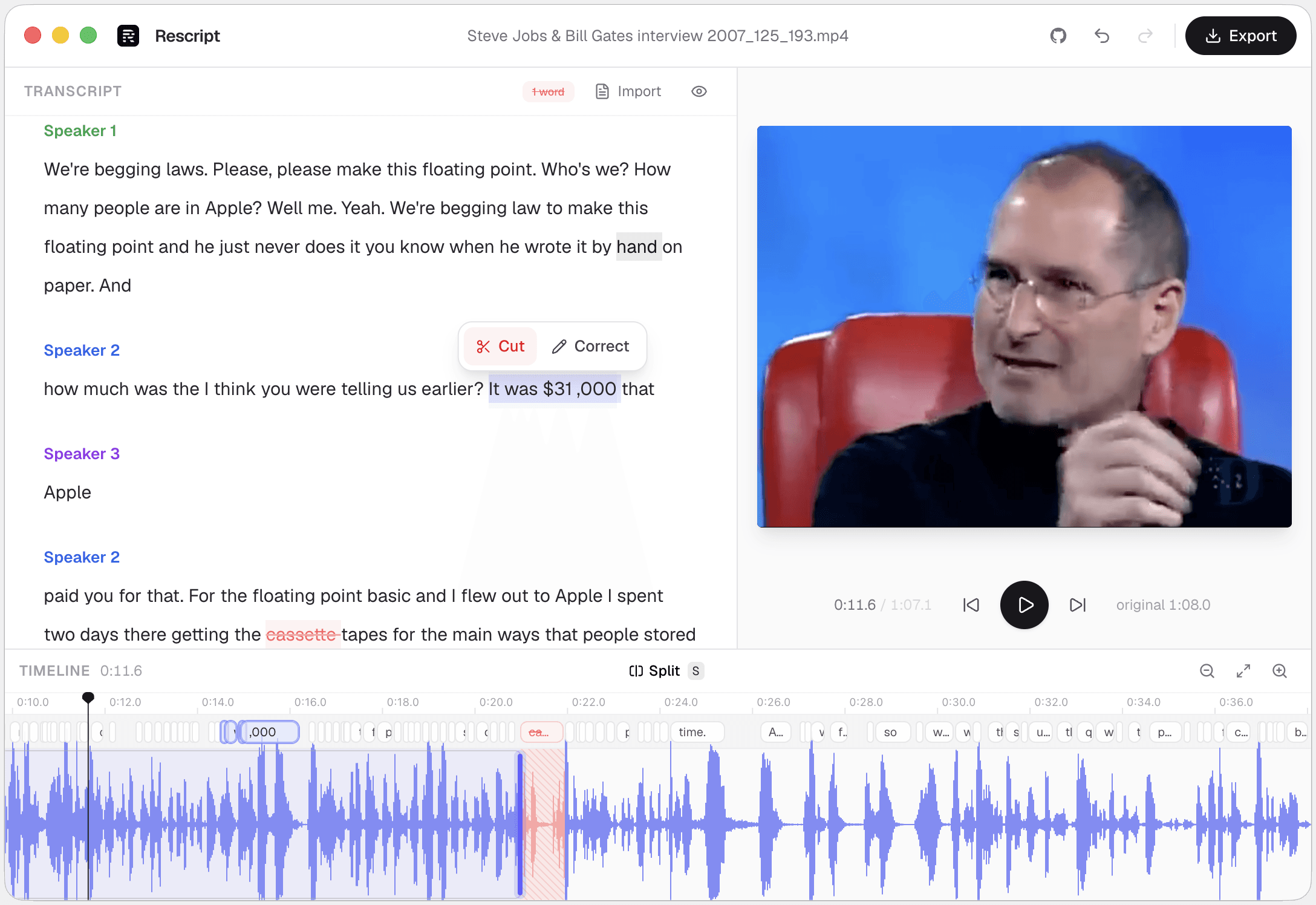
Side by side
Rescript compared with Cleanvoice.
| Feature | Rescript | Cleanvoice |
|---|---|---|
| Price | Free and open source for noncommercial use | Paid per hour of audio, or by subscription |
| Where your media goes | Nowhere. It never leaves your device | Audio is uploaded to be processed |
| Account required | None — open it and start editing | Required |
| Works offline | Yes, once the model has downloaded a first time | Cloud service |
| Source code | Public on GitHub — auditable | Proprietary |
| Filler word removal | One click across the whole file | Fillers, plus stutters and mouth sounds |
| Silence removal | One click, pauses of 0.3s and over | Dead air removal |
| Delete words to cut footage | Word-level, with a live preview of the cut | Not an editor — it returns a processed file |
| Noise removal / audio repair | No — nothing like Studio Sound | Mouth-sound removal, de-essing, levelling |
| Rewrite a line and have it spoken | Yes — cloned from that speaker's own audio, on-device | No |
| Timeline | Waveform, split, trim handles, draggable cut edges | No editing interface |
 Rescript
Details about other products come from their own public pricing and documentation pages and change often — check theirs before you decide. Corrections are welcome as a GitHub issue.
A service versus an editor
Cleanvoice is designed to disappear into your workflow: send audio, get better audio. Its detection covers things Rescript has no concept of — mouth sounds, stutters, repeated words. If those are what make your raw audio unusable, Rescript won't fix them.
Rescript's filler removal is a click inside an editor. Every cut lands as a visible, editable region: you can see which words went, restore any of them, and drag a cut's edges. Nothing is billed by the hour.
The upload question
Per-hour cloud processing means every episode gets copied to a third party. For a public podcast that's usually a non-issue. For a research interview, a legal recording, or anything under NDA, it can be disqualifying regardless of the vendor's policies.
Rescript's processing is local by construction — Whisper in your browser, diarization locally, ffmpeg.wasm on your CPU. After the models download once, you can work with the network off.
Which one
They're good at different jobs.
Choose Cleanvoice if…
- Mouth clicks, lip smacks, and stutters are the actual problem, not just "um".
- You want it to run as a step in an automated pipeline via their API.
- You'd rather not review the cuts and just want a cleaner file back.
- You need loudness normalisation and de-essing in the same pass.
Choose Rescript if…
- You don't want to pay per hour, and you record a lot of hours.
- The audio can't be uploaded to a third-party service.
- You want to see and approve each cut, and adjust the ones you disagree with.
- You also need to cut content, not just clean it.
FAQ
Questions people actually ask
Is there a free alternative to Cleanvoice?
Rescript removes filler words and silences from audio and video on your own machine, free for noncommercial use and with no per-hour billing. It does not remove mouth sounds or stutters, which Cleanvoice does.
Does Rescript remove breaths and mouth sounds?
No. It detects filler words and silences of 0.3 seconds and over. Breaths, lip smacks, and stutters aren't detected — you can cut them by hand on the timeline, but they aren't automated.
Which filler words does Rescript detect?
Common disfluencies such as um, uh, er, and similar, in the transcript language. Detection runs against the local Whisper transcript, so anything it misses can be deleted by selecting the word.
Keep comparing

Rescript vs Descript
The original transcript-based editor — and a full cloud studio.

Rescript vs Riverside
Remote recording studio with a text-based editor attached.

Rescript vs VEED
Browser video editor with subtitles and AI tools.

Rescript vs Kapwing
Collaborative online editor with text-based trimming.

Rescript vs Premiere Pro
Adobe's NLE, with Text-Based Editing built in.

Rescript vs CapCut
ByteDance's free general-purpose editor.

Rescript vs Podcastle
Cloud podcast studio with AI voices and Magic Dust.

Rescript vs Recut
One-time-purchase desktop app for cutting silences.

Rescript vs TimeBolt
Automatic cutting of silence and filler words.
Try it before you renew Cleanvoice.
Free, open source, and running on your own machine in under a minute. No account, and nothing to cancel later.
Or open the web app