


Rescript vs CapCut
Rescript vs CapCut
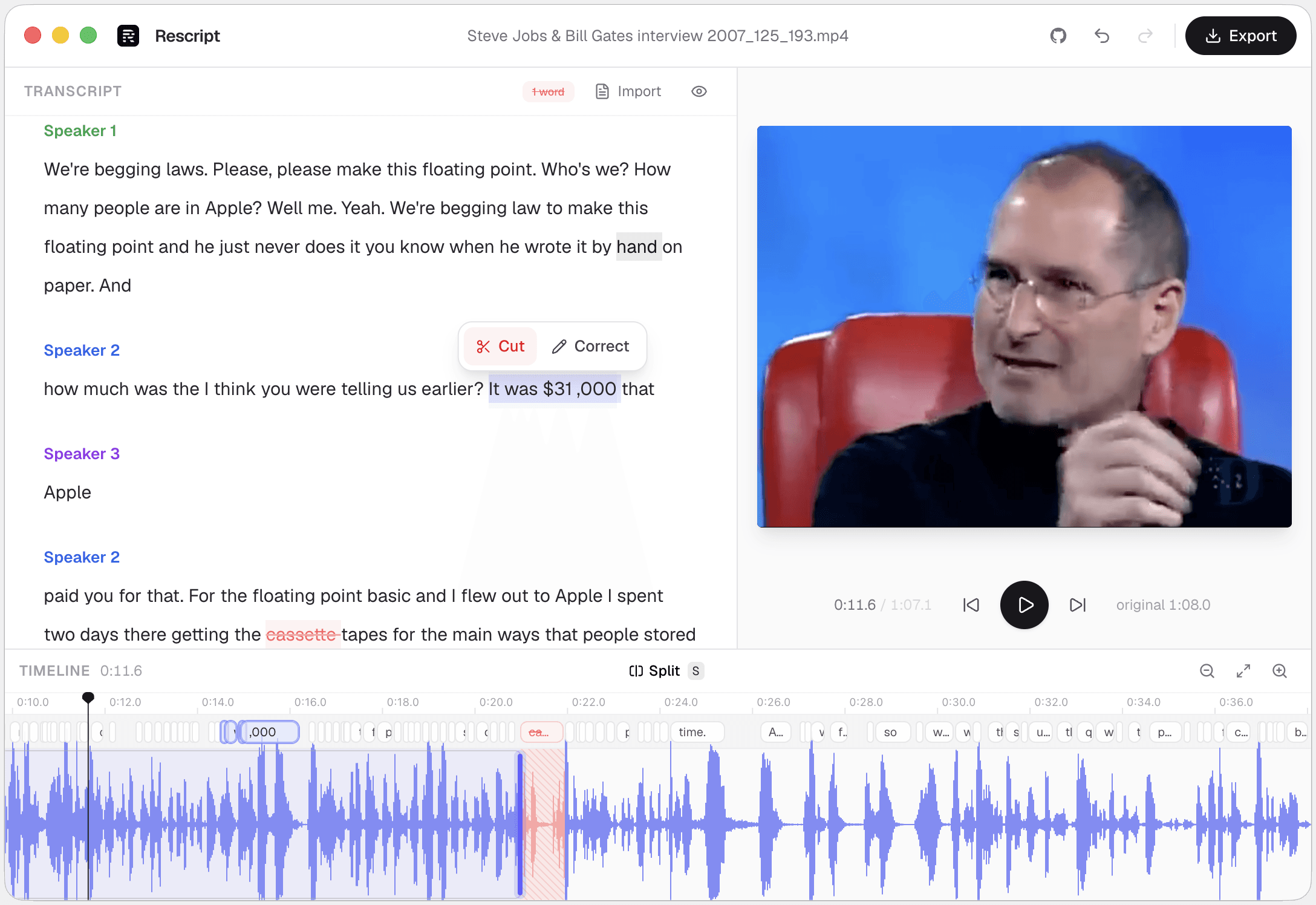
CapCut is a free, capable, general-purpose editor built around a conventional timeline with effects, templates, and a large asset library — and around an account, cloud sync, and some features behind CapCut Pro. Rescript is a different shape of tool: transcript-first, single-clip, open source, no account, nothing leaving your device. CapCut does more kinds of editing. Rescript cuts a spoken-word recording faster, runs without signing in, and lets you audit exactly what it does with your footage.
Side by side
Rescript compared with CapCut.
| Feature | Rescript | CapCut |
|---|---|---|
| Price | Free and open source for noncommercial use | Free, with features behind CapCut Pro |
| Account required | None — open it and start editing | Required, and tied to a ByteDance account |
| Where your media goes | Nowhere. It never leaves your device | Local editing, but cloud features and sync are woven in |
| Source code | Public on GitHub — auditable | Proprietary |
| Works offline | Yes, once the model has downloaded a first time | Core editing works; AI features need the cloud |
| Watermark | Never | Some templates and effects add one |
| Delete words to cut footage | Word-level, with a live preview of the cut | Auto-captions can drive trimming; not a true transcript editor |
| Filler word removal | One click across the whole file | Available, and improving |
| Silence removal | One click, pauses of 0.3s and over | Auto-cut of pauses |
| Speaker detection | Local diarization, speakers renameable | No diarization |
| Rewrite a line and have it spoken | Yes — cloned from that speaker's own audio, on-device | Stock AI voices and text-to-speech, not the speaker's own voice |
| Multitrack, layers, effects | No — one clip, transcript-first | Full timeline, effects, transitions, stock library |
| Burned-in captions | Exports SRT/VTT to burn in elsewhere; no styled overlay yet | Auto-captions with styling and animation |
| Runs on | Browser, macOS, Windows, Linux | Desktop, web, iOS, Android |
 Rescript
 CapCut
Details about other products come from their own public pricing and documentation pages and change often — check theirs before you decide. Corrections are welcome as a GitHub issue.
Transcript-first versus timeline-first
CapCut gives you a conventional timeline — clips, tracks, keyframes, effects — with captions as something you add to the output. In Rescript the transcript is the timeline: deleting a sentence in the text is the edit.
For a forty-minute interview that difference compounds. Finding every stumble by scrubbing a waveform is slow; reading the transcript and deleting the bad sentences is not. Rescript also has the tools that go with that workflow — local speaker diarization, and Regenerate for respeaking a line in the speaker's own voice rather than a stock narrator.
What you're trusting
CapCut is free, which raises the question of what it costs in other ways: it requires an account, syncs to the cloud, and its data practices have drawn ongoing scrutiny. Fine for a TikTok edit; possibly unacceptable for a client interview under NDA.
Rescript's answer is structural rather than a promise. There's no account to create and no server to send anything to, and the source is on GitHub — so the claim is checkable rather than trusted.
Which one
They're good at different jobs.
Choose CapCut if…
- You're making short-form social video with effects, trends, and music.
- You edit on a phone or tablet.
- You want a big library of templates and stock assets.
- The video needs styled, animated captions burned in.
Choose Rescript if…
- You don't want an account, or your footage near a cloud sync.
- The material is confidential, or your workplace forbids consumer cloud tools.
- You want to read the source of the software handling your media.
- The recording is long and speech-driven, and you need speaker labels.
FAQ
Questions people actually ask
Is Rescript a full replacement for CapCut?
No. CapCut is a general video editor with effects, templates, multitrack, and mobile apps. Rescript edits a single clip against its transcript. If your edit is mostly cutting speech, Rescript replaces CapCut for that job; if it involves compositing and effects, it doesn't.
Does Rescript need an account?
No. Open the web app or the desktop app and start editing. There's no sign-up, no login, and no usage meter.
Can Rescript add captions to a video like CapCut does?
It exports SRT, VTT, and JSON caption files matched to the edited timeline. It does not yet burn styled captions into the video — that's on the roadmap.
Keep comparing

Rescript vs Descript
The original transcript-based editor — and a full cloud studio.

Rescript vs Riverside
Remote recording studio with a text-based editor attached.

Rescript vs VEED
Browser video editor with subtitles and AI tools.

Rescript vs Kapwing
Collaborative online editor with text-based trimming.

Rescript vs Premiere Pro
Adobe's NLE, with Text-Based Editing built in.

Rescript vs Podcastle
Cloud podcast studio with AI voices and Magic Dust.

Rescript vs Recut
One-time-purchase desktop app for cutting silences.

Rescript vs TimeBolt
Automatic cutting of silence and filler words.

Rescript vs Cleanvoice
AI post-processing service for podcast audio.
Try it before you renew CapCut.
Free, open source, and running on your own machine in under a minute. No account, and nothing to cancel later.
Or open the web app