
Edit videos like you edit text.
Rescript transcribes your video and audio on-device, cuts the footage as you delete words, and respeaks the lines you rewrite — in the original voice.
macOS · Windows · Linux
How it works
Three steps, none of them a timeline scrub.
Drop in your media
Whisper transcribes on-device with word-level timestamps and speaker labels. Already have captions? Import your own SRT, VTT, or JSON instead.
Delete the words you don't want
Select text, hit delete, and the matching footage is cut. Strip fillers and silences in one click. Playback skips every cut in real time.
Export the cut
Video, audio, transcript, or subtitles — rendered with ffmpeg on your own machine. Nothing is uploaded at any point.
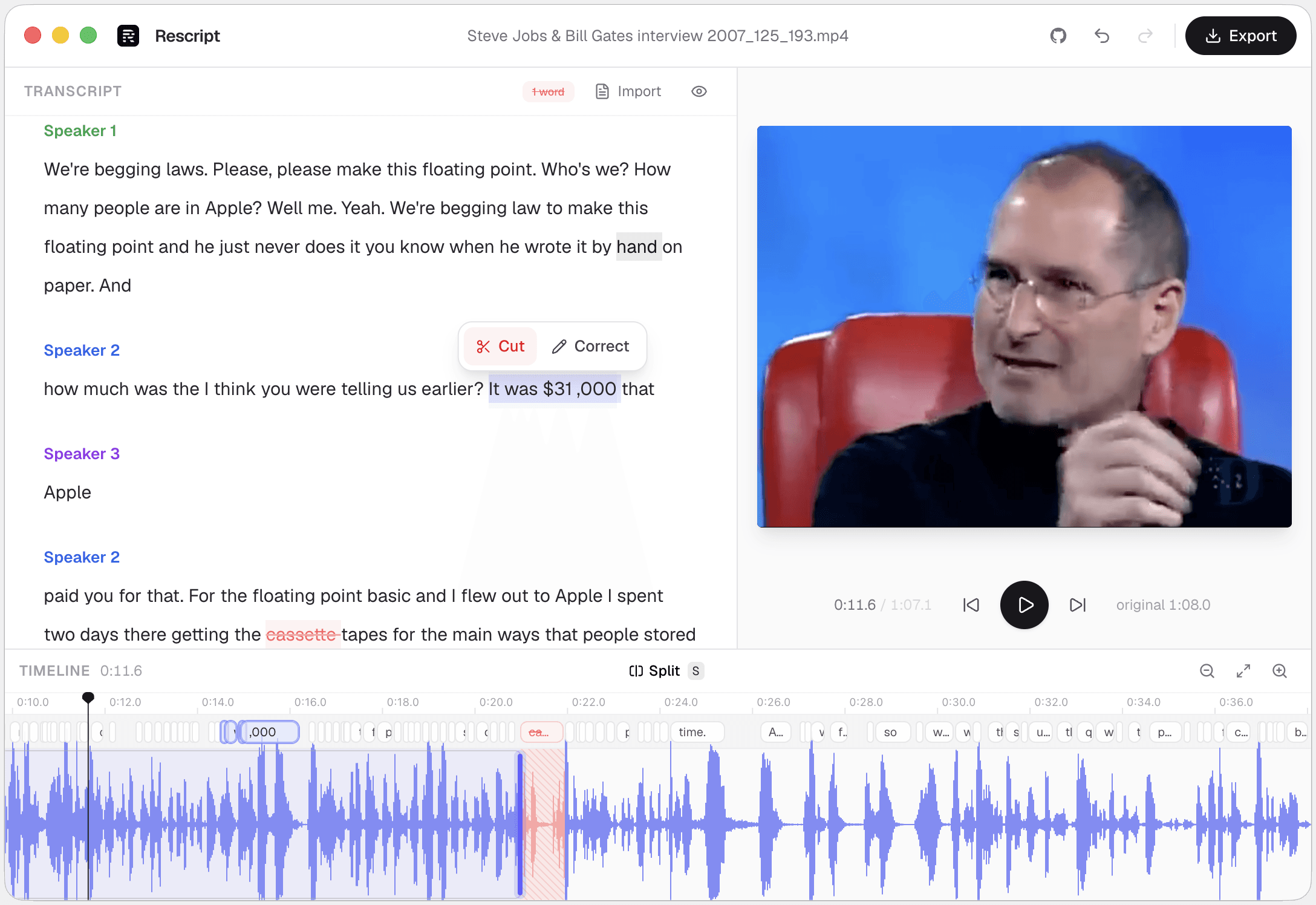
Delete a word, cut the footage
So um, the thing about floating point is you know, it was $31,000 that Apple paid uh, for that.
Struck-through words are already removed from the render. Preview plays the cut, not the original.
Features
Everything you need to cut speech-driven media.
Word-level editing
The transcript is the timeline. Delete a phrase and the cut lands exactly where those words were spoken.
One-click cleanup
Remove “um”, “uh”, and every silence over 0.3s across the whole file without scrubbing a waveform.
Regenerate a line
Rewrite a sentence you fumbled and hear it back in that speaker's own voice — cloned on your machine from audio already in the file.
Speaker detection
Automatic diarization groups the transcript by speaker, so multi-person interviews stay readable while you edit.
A real timeline
Waveform, word bar, split, cut regions, and draggable handles. Zoom, pan, and nudge timings by hand when you need to.
Private by design
Transcribing, editing, and exporting all run on your machine — no account, no upload. After the model downloads once, you can pull the network cable.
Regenerate
Fix a line without re-recording it.
Deleting words handles the takes you don't want. For the one you got wrong, rewrite it and press Generate — Rescript speaks it in that speaker's own voice.
- The voice is cloned from about ten seconds of that speaker's own clean audio, already in your file. No training session, no voice profile on anyone's server.
- Works for any speaker in a multi-person recording, not just you.
- A fit meter shows whether the new line will land in the gap before you generate it.
- Synthesis runs on your machine, like everything else here.
Rewrite it, don't re-shoot it
... it started in March of last year April of last year.
The new audio is fitted to the exact span it replaces, so nothing downstream of it moves. Voices in English, Spanish, French, German, Italian, and Portuguese.
Regenerate is for fixing your own recordings.
Cloning someone else's voice needs their consent — the rules are here.
Privacy
Your media never leaves your machine.
Interviews, therapy sessions, legal recordings, unreleased footage — none of it is ours to see. Transcribing, editing, generating voice, and exporting all happen on your device, and none of it needs an account.
Transcription
Whisper runs locally through WebGPU, falling back to WASM. Models are fetched once, then cached.
Editing
Cuts, timings, and speaker labels are saved locally in your browser or app, no servers.
Voice
Regenerate clones and synthesizes on-device. The reference audio and the voice never leave your machine.
Export
ffmpeg.wasm re-encodes on your CPU. The finished file is written straight to your disk.
Export
Save your cut in any format.
One edit, every deliverable — the cut video, an audio-only version, a clean transcript, and burnable captions.
- Video
- MP4 · WebM · up to 4K
- Audio
- M4A · MP3 · WAV
- Transcript
- TXT · Markdown
- Subtitles
- SRT · VTT · JSON
Switching from something else?
How Rescript compares.
Honest head-to-head write-ups, including the cases where the other tool is the better answer.
Download
Free, open source, and yours in one click.
Desktop builds auto-update from GitHub Releases. Prefer zero install? The same editor runs in your browser.
or Open the web appIs Rescript free?
Yes, for noncommercial use, under the PolyForm Noncommercial 1.0.0 license. The web app and every desktop build are available immediately — no account, no trial, no usage meter. Everything that runs on your own device stays free. Commercial use requires a paid license, and we may later add optional paid features that run on our servers.
Does my media ever leave my device?
No. Transcription, editing, and export all happen locally, and your video and audio files are never uploaded to do any of them. The only network request is the one-time download of the Whisper model from Hugging Face, which is then cached. If we ever ship a feature that needs a server, it will be opt-in and clearly labelled as such.
Do you collect any analytics?
The app reports anonymous page views and app opens so we can tell roughly how many people use Rescript — no file names, no transcripts, no audio, no account, nothing that identifies you. It's ordinary web analytics, it's visible in the source, and any content blocker stops it.
Do I have to install anything?
Not unless you want to. The full editor runs in the browser. Desktop builds for macOS, Windows, and Linux exist for when you'd rather have an offline-first install that auto-updates from GitHub Releases.
Which browsers work best?
A Chromium-based browser is recommended. Rescript needs SharedArrayBuffer, and uses WebGPU for transcription when it's available, with a WASM fallback otherwise.
Can I bring my own transcript?
Yes. Skip transcription entirely and import an existing SRT, VTT, or JSON caption file, then edit the media against it.
How accurate is the transcription?
It uses Whisper Base or Small, which handle clear speech well. Word timings and text are both editable, so you can correct anything the model gets wrong and the cuts follow your correction.
Does it identify different speakers?
Yes. Speaker diarization runs locally via pyannote-segmentation-3.0 and labels each block of the transcript, and you can rename speakers.
Can I change what was said, not just cut it?
Yes — that's Regenerate. Select the words, type what you meant, and Rescript synthesizes the new line in that speaker's voice. The voice is cloned on your device from roughly ten seconds of their own clean audio already in the recording, so there's no training session and no voice profile stored anywhere. It works for any speaker in the file, not just you.
Does a regenerated line throw the rest of the edit out of sync?
No. A regenerated line is authored to occupy exactly the span it replaces: it grows into adjacent silence where there's room, pads with real silence if it comes up short, and only time-compresses as a last resort. A fit meter warns you before you generate, and it refuses outright rather than speeding a line up past the point where it sounds wrong.
Which languages can Regenerate speak?
English, Spanish, French, German, Italian, and Portuguese, using Pocket TTS running locally through ONNX. The voice bundle for a language downloads once — about 140 MB for the faster models, around 360 MB for the higher-quality ones — and is then cached like the Whisper model. If the transcript is in a language with no voice model, Rescript refuses rather than regenerating in the wrong one.
Is it really open source?
Every line is on GitHub. You can audit the privacy claims yourself, open issues, or contribute — there's no black box to take on trust.